





Managed databases on AWS
Managed databases by Selfhost.dev, run for you.
Dedicated PostgreSQL®, MySQL®, Redis®, ClickHouse® and OpenSearch® instances on AWS, plus Kafka®-compatible brokers that keep topic data in S3, provisioned in minutes and run for you: live metrics and alerts, scaling and Multi-AZ failover on every engine, automated backups on the databases, point-in-time recovery and connection pooling on PostgreSQL and MySQL, real-time OLAP analytics on ClickHouse and search with built-in vectors on OpenSearch. In our AWS account or yours with BYOC. Pay only for what you run and manage the databases from your AI editor.
+$5.00 in free credit at signup · no card needed
The reliable home for your data.

Dedicated PostgreSQL, MySQL, Redis, ClickHouse, OpenSearch and Kafka on AWS, with BYOC into your own account. Multi-AZ on all six, PITR on Postgres and MySQL.
In our AWS account or your own with BYOC. You get AWS uptime and performance; we handle the ops.
Pricing, before the fine print
Start small. Scale when the workload does.
No plans, tiers or subscriptions.
Every feature is available from the first dollar. Choose an engine, region, instance size and storage, then pay by the hour from prepaid credits. Stop an instance and its compute charge stops too.
Free to try
$5 welcome credit
No card needed. Spend it on any engine.
PostgreSQL
$8.10 /mo and up, Mumbai
PITR, PgBouncer, users and roles, Multi-AZ, full config control and BYOC.
PostgreSQL detailsMySQL
$8.10 /mo and up, Mumbai
PITR, ProxySQL, users and roles, Multi-AZ, parameter tuning and BYOC.
MySQL detailsRedis
$5.34 /mo and up, Mumbai
Backups, snapshots, read replicas, forking, Multi-AZ, live metrics and BYOC.
Redis detailsClickHouse
$27 /mo and up, Mumbai
Columnar OLAP, Keeper high availability, distributed queries, SQL users and BYOC.
ClickHouse detailsOpenSearch
$25 /mo and up, Mumbai
Search and k-NN vectors, OpenSearch Dashboards, HA clusters with dedicated managers, snapshots and BYOC.
OpenSearch detailsStarting prices use the smallest supported configuration in ap-south-1 (Mumbai), metered hourly: a 1 GB t4g.micro for PostgreSQL and MySQL, a t4g.nano for Redis, with 1 GB of storage and the 20 GB boot volume. In us-east-1 those three start at $10.55, $10.55 and $6.41. Kafka is priced in the console before you create, with its S3 storage and requests billed on usage. Your exact total varies by engine, region, compute, storage, replicas and network use.
See the product, not a promise
Empty form to live connection.
Watch the whole managed database flow.
Three self-paced chapters show the real console flow: choose the database and AWS configuration, review the exact cost, wait for provisioning, then manage backups, pooling, users, metrics and alerts.
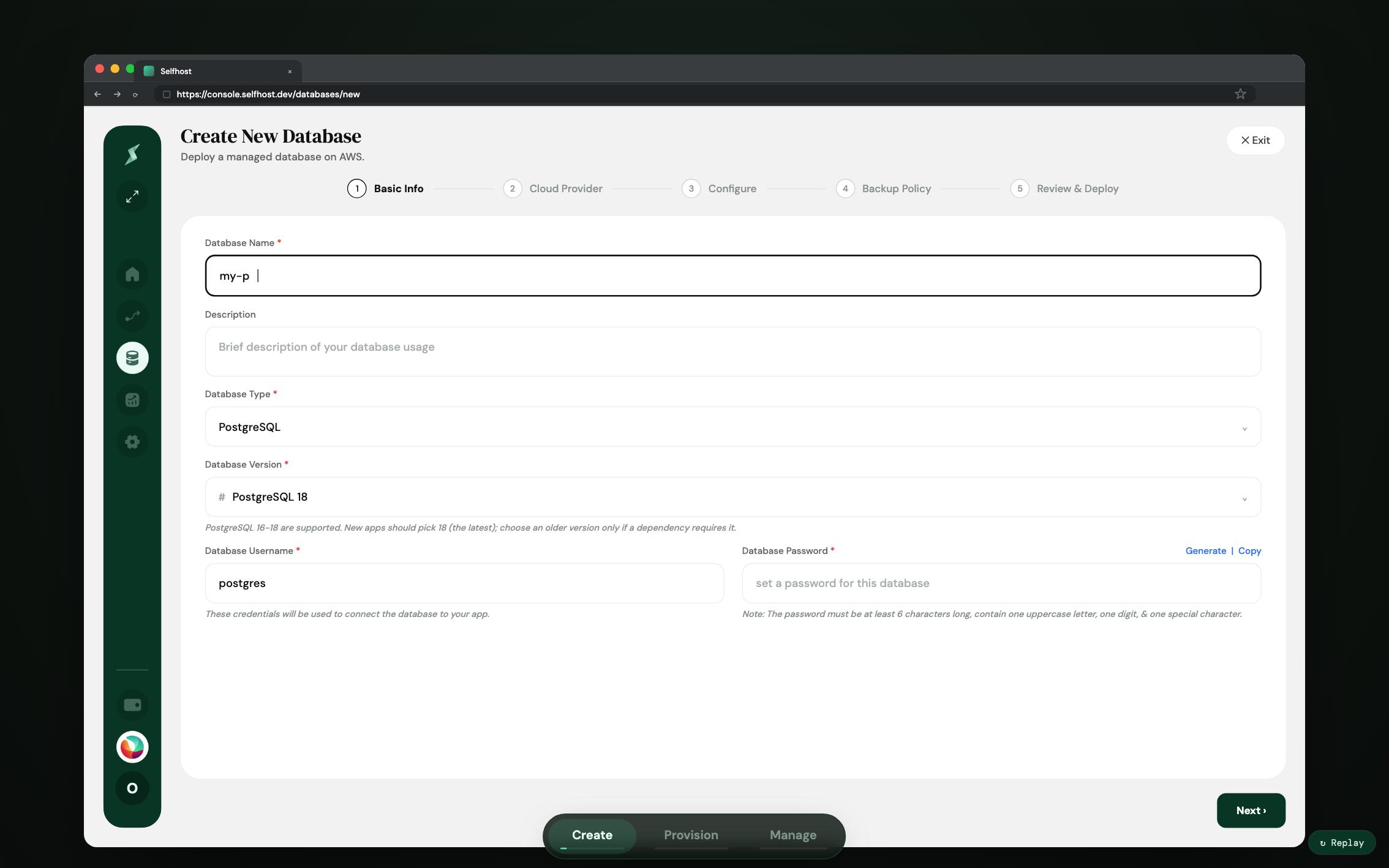
This walkthrough is built at desktop width and is best opened on a larger screen. Every chapter is written out below.
- 01 Create Walk through the five-step wizard: engine, AWS region, instance size, storage, backup policy and a final cost review before anything is deployed.
- 02 Provision Watch the instance come online on AWS with encrypted storage, automated backups, a Multi-AZ standby and a connection string ready to copy.
- 03 Manage See the day-two controls: backup schedules, PgBouncer connection pooling, database users and roles, live metrics and alert rules.
Limited time · Get $5 in free credit at signup
Ready to run the real one?
The walkthrough is the same creation flow you will use in the console. Your welcome credit lets you try the smallest managed database before topping up.
One platform, every workload
Pick your database.
Everything else is handled.
Prefer to see it first? The database walkthrough runs the whole thing in three chapters, from the create wizard to a live connection string.
Managed PostgreSQL
Production PostgreSQL with the deepest feature surface on the platform, from restore-to-any-second to a config editor that previews the effect of a change before you apply it.
- + PgBouncer connection pooling, included
- + Point-in-time recovery, restore to any second
- + Fork a database for staging or analytics
- + Full postgresql.conf control, with change preview
Managed MySQL
The same dedicated managed instance, for the MySQL side of the world: Laravel, WordPress and every app that speaks MySQL, run for you on AWS.
- + ProxySQL connection pooling, included
- + Point-in-time recovery, down to the minute
- + Multi-AZ standby with automatic failover
- + MySQL parameter tuning, no locked-down groups
Managed Redis
A dedicated in-memory store on AWS, run for you: caching, queues, sessions and pub/sub on your own dedicated instance, not a slice of a multi-tenant cache.
- + Automated backups and snapshots
- + Read replicas and forking for staging
- + Standard Redis, any client connects
- + BYOC on your own AWS account
Managed ClickHouse
Our first OLAP engine: a columnar database for real-time analytics over billions of rows. Events, logs, dashboards and time-series, run for you on AWS.
- + Columnar OLAP, sub-second aggregations
- + Keeper high availability, automatic failover
- + HTTP and native protocols, SQL users
- + BYOC on your own AWS account
Managed OpenSearch
Search and analytics over a REST API, with k-NN vector search built into the engine. App search, log analytics with Dashboards and retrieval for RAG, run for you on AWS.
- + HTTPS only, users with read, write and admin roles
- + k-NN vector search, no extension to enable
- + OpenSearch Dashboards, one switch
- + HA clusters with three dedicated manager nodes
Managed Kafka
Kafka-compatible brokers that keep topic data in S3 instead of on their own disks. One broker or three across zones, created in the console like every other engine.
- + Topic data in S3, replication factor 1 by design
- + SASL/SCRAM users with ACLs
- + A failed broker fenced and replaced automatically
Managed pgvector
A vector database on managed PostgreSQL. Store embeddings next to your relational data and search by meaning, for semantic search and RAG, with no separate vector store to keep in sync.
- + HNSW and IVFFlat indexes for fast similarity search
- + One-click enable, billed as the Postgres instance
- + Full managed Postgres underneath: PITR, pooling, Multi-AZ, BYOC
Managed TimescaleDB
A time-series database on managed PostgreSQL. Hypertables, native columnar compression and continuous aggregates for metrics, events and IoT, with no separate time-series database to run. See how it stacks up against the alternatives in our best time-series database guide.
- + Hypertables with automatic time-partitioning
- + Columnar compression and continuous aggregates
- + Full managed Postgres underneath: PITR, pooling, Multi-AZ, BYOC
Databases beside your app
Looking for MongoDB or a database on the same server as the app that uses it? Add PostgreSQL, MySQL, Redis or MongoDB one-click inside a Project, where you also deploy apps from GitHub.
- + MongoDB one-click, next to your app
- + Qdrant, Supabase and Elasticsearch from the one-click catalog
- + Apps from GitHub on the same server
Limited time · Get $5 in free credit at signup
Found the engine your workload needs?
Choose the version, AWS region, instance size and storage in the console. You will see the estimated hourly and monthly cost before deployment.
What you get
Every instance ships production-ready.
Without hiring a DBA.
Point-in-time recovery
Continuous archives let you restore PostgreSQL to any second and MySQL to the minute, into a fresh instance. The 3am mistake stops being fatal.
Snapshots and backup policies
Manual snapshots on demand, plus scheduled backup policies with the retention you choose. Restore any of them whenever you need. Kafka backs up topic settings, ACLs and users instead, because its messages live in S3.
Connection pooling, included
PgBouncer for PostgreSQL, ProxySQL for MySQL, managed from the console. No separate proxy to bolt on or pay extra for.
High availability
Multi-AZ with automatic failover on every engine: a toggle on PostgreSQL, MySQL, Redis and ClickHouse, a cluster across zones you pick at create on OpenSearch and Kafka. Production resilience without manual setup.
Autoscaling, scheduled or reactive
Resize on demand and on PostgreSQL, MySQL, ClickHouse and OpenSearch set reactive autoscaling rules that follow load or schedule start, stop and scale windows so idle capacity costs nothing. Kafka keeps the machine size you create it on and grows its storage.
Users, roles and rotation
Database users with read-only, read-write and admin roles, connection limits and one-click password rotation, on PostgreSQL and MySQL.
Live metrics and alerts
Realtime, engine-aware charts with a live mode, plus alert rules that reach you by email or Slack before your users notice.
Locked down by default
IP whitelisting, delete protection and public access only if you turn it on. Your database is not on the open internet by accident.
Encrypted at rest, TLS where it applies
Your data is encrypted at rest on EBS with AWS KMS keys, so snapshots and backups are encrypted too. Client TLS is a switch on PostgreSQL, MySQL and ClickHouse, always on for OpenSearch and a create-time option on single-broker Kafka; Redis has no TLS switch yet.
Full config control
Tune engine parameters directly, on PostgreSQL and MySQL alike. No locked-down parameter groups between you and your database.
Limited time · Get $5 in free credit at signup
Put the production controls to work.
Start with the smallest instance and the full management surface. Backups, monitoring, alerts and engine controls are not locked behind a higher plan.
Your data: encrypted, isolated,
and always under your control.
Security is not a separate tier here. Every managed instance ships locked down by default, encrypted at rest and yours to export or run in your own cloud.
See how we secure and run your dataEncrypted at rest, TLS on a switch
AWS KMS on disk, snapshots and backups included. Client TLS is a switch on PostgreSQL, MySQL and ClickHouse; OpenSearch is HTTPS only.
Single-tenant, dedicated instance
Your own dedicated instance, not a shared multi-tenant database pool.
Private by default
IP whitelisting and delete protection are on. Public access only if you turn it on.
Multi-AZ, PITR and backups
Automatic failover on every engine, point-in-time restore on PostgreSQL and MySQL, automated backups on all.
Your data stays yours (BYOC)
Run it in your own AWS account. Standard engines, nothing proprietary, yours to keep.
Database user management
Stop sharing the admin password.
Users and roles, built into the console.
Most managed databases hand you a single admin login and leave user management to raw SQL. On managed PostgreSQL and MySQL, Selfhost.dev treats database users as first-class objects: create read-only, read-write or admin users per database, cap their connections and rotate a password in one click, from the console or straight from your editor via MCP. The API gets read-write, analytics gets read-only and nobody pastes the admin password into Slack.
- ✓ Read-only, read-write and admin roles per database
- ✓ Per-user connection limits
- ✓ One-click rotation, new secrets revealed once
Rotated credentials are shown once, then never stored in plain text again.
Benchmarked, not hand-wavy
Fast and proven in the open.
Full durability on, no special tuning.
Real pgbench numbers on managed PostgreSQL, with production durability settings and zero errors across every run. Methodology, gaps and caveats published alongside.
*Compared with an equivalent AWS RDS instance; RDS price estimated.
Built for production
250+ developers have signed up
with their production databases.
No uptime theater: reliability here is concrete machinery you can point at. A Multi-AZ standby that fails over automatically, continuous archives that restore to any second, backup policies that run on the schedule you set and alerts that reach you first.
Bring your own cloud
Our management.
Your AWS account.
Run managed PostgreSQL, MySQL, Redis, ClickHouse, OpenSearch or Kafka inside your own AWS account with BYOC. You keep full ownership of the infrastructure, the VPC and the data residency, while Selfhost.dev handles provisioning, backups, failover and monitoring. New to the model? Here's what BYOC is and when it makes sense.
- ✓ Connect via access keys or an IAM role
- ✓ Your VPC, your security groups, your region
- ✓ No enterprise contract required
It is standard PostgreSQL, MySQL, Redis, ClickHouse and OpenSearch on standard AWS infrastructure. Your data, your dumps, your replication: nothing proprietary sits between you and the engine.
With BYOC the instance never leaves your account in the first place. Walk away any time and the database is still yours, running where it always was.
Pay-as-you-go either way. Build your exact bill.
AI-native management
Manage your databases with AI.
Right from your editor.
Create instances, run backups, tune parameters, configure alerts and inspect performance from Claude, Cursor, Devin Desktop or any MCP client. 239 MCP tools across 37 modules, every one mapped to a real API call, with destructive operations gated behind explicit confirmation.
How it compares
Cheaper than RDS.
More control than a PaaS.
Same Graviton hardware as RDS at a fraction of the cost, with PITR and pooling included instead of billed separately and BYOC in your own AWS account. See the real numbers, side by side.
Frequently asked questions
What managed databases does Selfhost.dev offer?
What is included with every managed instance?
How much does a managed database cost?
Can I bring my own AWS account?
How does it compare to AWS RDS?
Can I manage databases with AI?
Does Selfhost.dev offer managed Redis or MongoDB?
A production database, run for you.
Benchmarked and billed by the hour.
$5 in free credit is added automatically at signup, no card needed.